Laser Cutter

Checkout scheduling appears after you pass this badge quiz and your badge is marked pending.

Watch Video
Complete these items to earn the badge.
  • Lasers (Universal 60w) Badging
  • Hardware
  • Video watched, quiz taken, any questions?
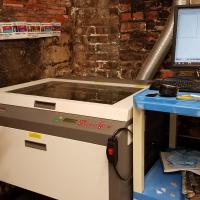
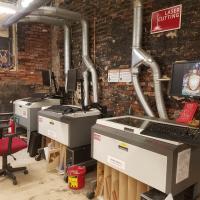
  • Identify the differences between Epilog and Universal lasers (power, layout, etc.)
  • Care of the machine
  • Lid all the way up when open, close gently (slamming degrades laser)
  • Clear range of motion on all three axes
  • Lens/optics (see below)
  • Fire safety
  • No unattended laser use (15-20’ or closer)
  • Pause/resume function to step away
  • Identifying fire vs. flareup; extinguishing fires
  • Cancel, pause, or open lid
  • Fire blanket
  • CO2 fire extinguisher (and why)
  • Chemical extinguisher, 911
  • Material safety
  • Organic materials
  • Laser-safe plastics/acrylics
  • Glass (etch only)
  • Unsafe materials
  • Damage to the machine (e.g., corrosive gas, soot on lens, melted plastic on bed)
  • Unsafe for users/bystanders (i.e., poisonous)
  • Ventilation - switch on when turning laser on
  • Prep for cutting
  • Check lens and mirror in cutting head
  • Clean gently, only when necessary
  • Cleanser only on cloth/tissue, never on lens
  • X-Y adjustment (correcting/setting new origin)
  • Focus (Z adjustment)
  • Shutdown/cleanup
  • Software (INKSCAPE)
  • Identify the difference between raster and vector files
  • Trace bitmap (optional)
  • Object to path on any shapes or text
  • Map colors, fill, and stroke to power levels and raster/vector behavior
  • Colors at absolute values
  • On RGB, a value of 255 on one color, 255 on “A” (saturation/opacity)
  • On CMYK scales, 100% on one color value
  • Stroke @ 0.2px or smaller for vector cutting
  • Check for/correct “Unset” or “Paint is undefined” errors
  • Sending print via Export => Win32VectorPrint
  • SKIP / RAST / VECT / RAST/VECT
  • Setting Power, Speed, and PPI
  • Image density
  • ALWAYS at 5 - double-check
  • Adjust and repeat as necessary
  • Sending grayscale etch via Print (optional)
  • Printer => x660
  • Preferences
  • Set power and speed
  • Advanced tab
  • Halftone for rougher materials, darker images
  • Error diffusion for smooter materials, lighter images
  • Black and White for true B/W images
Badge Checkout Requirement
In person checkout required
Facilitator Checkout

No Volunteers Currently Assigned

Earn Badge at Upcoming Event

Participation in this event take the place of meeting with a facilitator for a checkout, but you must still watch video and pass quiz in advance to earn badge.


Want to start using the laser cutter? This quick and friendly session is your chance to get badged and get cutting!

You’ll learn how to safely operate MakeHaven’s laser cutters and complete the Laser Cutter badge—unlocking independent access. During the session, you’ll cut a small project (like a keychain or nameplate) to practice the full process from design to finish.
Badges Earned

Facilitator Checkout

Checkout is required for this badge. Scheduling will be revealed after you pass the quiz and your badge is marked pending.

Badge
Li Yan
McCurdy
Member profiles
Badge
Adam
Rendall
Member profiles
Badge
Vlad
Alexandrescu
Member profiles
Badge
nate
madick
Member profiles
Badge
Joel
Greenwood
Member profiles
Badge
Jacob
Boerma
Member profiles
Badge
Pronouns
She/Her/Hers/Herself
Elise
DeVito
Member profiles
Badge
Jon
Webster
Member profiles
Badge
Pronouns
She Her Hers
Kate
Cebik
Member profiles
Badge
Karly
Greene
Member profiles
Badge
Brian
Tatro
Member profiles
Badge
Jeremy
Medow
Member profiles
Badge
Pronouns
he/him
Ethan
Rodriguez-Torrent
Member profiles
Badge
Pronouns
He him his
Billy
O'Shea
Member profiles
Badge
Pronouns
He
J.R.
Logan
Member profiles