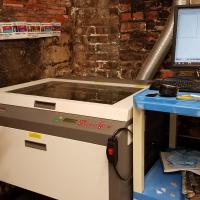


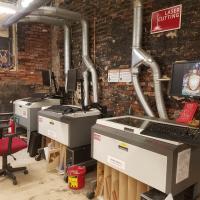
24"x 18" ULS Laser Cutter (60 Watt, V460)

This is a 60 watt laser, with a work area of 24" by 18".
Never leave the laser unattended when running. Be vigilant about fire safety: a CO2 extinguisher is fixed to one of the lasers and is the preferred extinguisher to use. Before use check the lens for dirt (its housing unscrews and you can take it out), a dirty lens can shatter from laser heat, if dirty clean it with the camera lens cleaning kit. Remember to turn on the fan.
Printing from Inkscape (click to download the appropriate version for your personal device)
In order to print from Inkscape in the vector format, you need to:
- Convert any objects (shapes, text, bitmaps) to paths. Convert bitmaps/png/rasters using the Path --> Trace Bitmap. Convert shapes using Path --> Object to Path.
- You also need your stroke width to 0.02 pixels or less (be sure units on line width are "px" not "in")
- Make sure that the stroke color is solid (ex R:255, G:0, B:0, A:255 for a red line)
- Print from the Extensions--> Export-->Win32 Vector Print. In this screen cut properties can be assigned to colors. You must also select vector for each color (box to the left of each color).
- It is also sometimes helpful to work in the outline mode when designing very thin vectors. You may go into outline mode by clicking View-->Display Mode-->Outline. Please remember to go back into Normal display mode when you would like to print a raster.
In order to print from Inkscape in the raster format, you need to:
- Define Fill under Stroke and Fill.
- Make sure that the fill color is solid (ex R:255, G:0, B:0, A:255 for a red line)
- Print from the Extensions--> Export-->Win32 Vector Print. In this screen cut properties can be assigned to colors. You must also select raster for each color (box to the left of each color).
In order to print greyscale, print from the File-->Print Dialog box. See more details below.
Tips:
- Go to File > Document Properties and change Display Units to Inches to make alignment easier
- If the laser is starting anywhere but the top left corner, click X-Y, and reset the origin to the top left corner
- If you send a print job and the top is open the laser will not turn on the cutting laser but will show a red dot where it will cut.
- You can repeat any job by just pushing the green button again (great for multiple passes on a cut).
- When you are cutting through a material it is best to use a platform that allows air to escape from under the material. You will get cleaner cuts.
- Be sure any material you are cutting is cut all the way through before moving it, as you will not be able to get it in exactly the same spot again.
- When cutting make a small notch in your design along the edge of your material. You can use this to test if the cut is all the way through.
- Use the "skip" fuction for specific colors to avoid recutting areas you do not want to pass over again.
- Do a fast light vector on paper or cardboard to test placement. If you are engraving glass you can put your peice right over it.
- Plastics release fumes for several hours. Keep finished pieces in the laser enclosure with exhaust on until it no longer produces smells.
- Engrave with 70% gray instead of black – gives cleaner image, reduces chipping.
- When doing a raster of a photo first take it into Gimp and adjust the contrast to maximize the parts of the image you want to emphasize.
- Be sure to check the advanced tab to be sure there are not settings that mess with your print.
- If you find your image is extended or stretched try adjusting the image density slider in the print driver. 5 is a good setting.
- When printing a raster from the regular print menu in Inkscape remember to go to Document Properties and change the page color from transparent to white. Otherwise you will get a big block of black.
Focusing Information
This cutter is equipped with the 4.0 Lens and a 2.0 lens, which means its point of Focus is roughly 4" or 2". The 4 has more room to fudge distances, the 2 is a crisper line. We have a 3D Printed focus tool, which should allow you to focus correctly. Just load your piece into the cutter, below the laser head. Place the focus tool on top. While the printer is on, hit the Z button; then use the up and down arrows to move the laser head up and down. Use the Focus Tool the same way you would on the Epilog, the laser head should bump the notch on the tool and push it out of the way. It is now focused.
Recomended Settings
| MATERIAL | CUT/ENGRAVE | POWER | PPI | SPEED | RESULTING DEPTH | NOTES |
|---|---|---|---|---|---|---|
| ACRYLIC - CAST AND EXTRUDED | LIGHT RASTER ENGRAVING | 22% | 500 | 100% | .002" | |
| ACRYLIC - CAST AND EXTRUDED | DEEP RASTER ENGRAVING | 100% | 500 | 90% | .010" | |
| ACRYLIC - CAST AND EXTRUDED | VECTOR ENGRAVING | 20% | 1000 | 4% | .005" | |
| ACRYLIC - CAST AND EXTRUDED | VECTOR CUTTING | 100% | 1000 | 2% | .25" | |
| CORK (1/8" THICK) | RASTER ENGRAVNG | 30% | 500 | 80% | TEST SETTINGS! WASH MATERIAL WHEN FINISHED. | |
| CORK (1/8" THICK) | VECTOR CUTTING | 30% | 500 | 8.1% | TEST SETTINGS WITH YOUR PIECE. TAPE MATERIAL TO AVOID SCORCHING. | |
| DENIM | RASTER ENGRAVING | 45% | 400 | 100% | A bit | |
| PAPER | VECTOR CUTTING | 15% | 200 | 3.2% | .02" | |
| PLYWOOD | VECTOR CUTTING | 75% | 250 | 4.8% | .125" | |
| PLYWOOD | RASTER ENGRAVING | 50% | 250 | 30% | .02" | |
| CARDBOARD | VECTOR CUTTING | 25% | 250 | 4% | .125" | |
| CARDBOARD | VECTOR ENGRAVING | 10% | 250 | 4.0% | .05" | |
| CARDBOARD | RASTER ENGRAVING | 30% | 250 | 80% | .01" | Medium dark engraving |
| ANODIZED ALUMINUM | RASTER ENGRAVING | 30% | 500 | 100% | .001" | |
| ANODIZED ALUMINUM | VECTOR ENGRAVING | 4% | 1000 | 4% | .001" | |
| GLASS / CRYSTAL | RASTER ENGRAVING | 100% | 300 | 30% | .001" | |
| GLASS / CRYSTAL | VECTOR ENGRAVING | 10% | 300 | 7.9% | .001" | |
| LEATHER | RASTER ENGRAVING | 19% | 500 | 100% | .001" | |
| LEATHER | VECTOR ENGRAVING | 3% | 500 | 4% | .001" | |
| LEATHER | VECTOR CUTTING | 50% | 200 | 2.1% | .1" | |
| RUBBER STAMPS | RASTER ENGRAVING | 23% | 500 | 23% | .03" | Smells really bad. Be sure to let air clear befoe opening. Only used laser safe rubber |
| RUBBER STAMPS | PERFORATED VECTOR CUTTING | 60% | 90 | 3.1% | .04" | |
| WOOD | RASTER ENGRAVING | 100% | 500 | 25% | .02" | |
| WOOD | VECTOR ENGRAVING | 80% | 500 | 10.1% | .03" | |
| WOOD | VECTOR CUTTING | 50% | 250 | 3.1% | .125" | |
| Cotton Cloth | VECTOR CUTTING | 60% | 400 | 8% | Prone to lighting on fire. Must monitor entire time closely. Fire will start on edges or where folded. Fire will also start where path crosses self. |
What Material Can Be Laser Cut
Cutting
| Material | Max thickness | Notes | WARNINGS! |
| Many woods | 1/4" | Avoid oily/resinous woods | Be very careful about cutting oily woods, or very resinous woods as they also may catch fire. |
| Plywood/Composite woods | 1/4" | These contain glue, and may not laser cut as well as solid wood. | |
| MDF/Engineered woods | 1/4" | These are okay to use but may experience a higher amount of charring when cut. | |
| Paper, card stock | thin | Cuts very well on the laser cutter, and also very quickly. | |
| Cardboard, carton | thicker | Cuts well but may catch fire. | Watch for fire. |
| Cork | 1/4" | Cuts nicely, but the quality of the cut depends on the thickness and quality of the cork. Engineered cork has a lot of glue in it, and may not cut as well. | Avoid thicker cork. |
| Acrylic/Lucite/Plexiglas/PMMA | 1/2" | Cuts extremely well leaving a beautifully polished edge. | |
| Thin Polycarbonate Sheeting (<1mm) | <1mm | Very thin polycarbonate can be cut, but tends to discolor badly. Extremely thin sheets (0.5mm and less) may cut with yellowed/discolored edges. Polycarbonate absorbs IR strongly, and is a poor material to use in the laser cutter. | Watch for smoking/burning |
| Delrin (POM) | thin | Delrin comes in a number of shore strengths (hardness) and the harder Delrin tends to work better. Great for gears! | |
| Kapton tape (Polyimide) | 1/16" | Works well, in thin sheets and strips like tape. | |
| Mylar | 1/16" | Works well if it's thin. Thick mylar has a tendency to warp, bubble, and curl | Gold coated mylar will not work. |
| Solid Styrene | 1/16" | Smokes a lot when cut, but can be cut. | Keep it thin. |
| Depron foam | 1/4" | Used a lot for hobby, RC aircraft, architectural models, and toys. 1/4" cuts nicely, with a smooth edge. | Must be constantly monitored. |
| Gator foam | Foam core gets burned and eaten away compared to the top and bottom hard paper shell. | Not a fantastic thing to cut, but it can be cut if watched. | |
| Cloth/felt/hemp/cotton | They all cut well. Our "advanced" laser training class teaches lace-making. | Not plastic coated or impregnated cloth! | |
| Leather/Suede | 1/8" | Leather is very hard to cut, but can be if it's thinner than a belt (call it 1/8"). Our "Advanced" laser training class covers this. | Real leather only! Not 'pleather' or other imitations! |
| Magnetic Sheet | Cuts beautifully | ||
| NON-CHLORINE-containing rubber | Fine for cutting. | Beware chlorine-containing rubber! | |
|
Carbon fiber mats/weave that has not had epoxy applied |
Can be cut, very slowly. | You must not cut carbon fiber that has been coated!! | |
| Coroplast ('corrugated plastic') | 1/4" | Difficult because of the vertical strips. Three passes at 80% power, 7% speed, and it will be slightly connected still at the bottom from the vertical strips. |
Etching
All the above "cuttable" materials can be etched, in some cases very deeply. In addition, you can etch:
| Material | Notes | WARNINGS! |
| Glass | Green seems to work best...looks sandblasted. | Only FLAT GLASS can be engraved in our cutter. No round or cylindrical items. |
| Ceramic tile | ||
| Anodized aluminum | Vaporizes the anodization away. | |
| Painted/coated metals | Vaporizes the paint away. | |
| Stone, Marble, Granite, Soapstone, Onyx. | Gets a white "textured" look when etched. | 100% power, 50% speed or less works well for etching. |
NEVER LASER THESE MATERIALS
| Material | DANGER! | Cause/Consequence |
| PVC (Poly Vinyl Chloride)/vinyl/pleather/artificial leather | Emits pure chlorine gas when cut! | Don't ever cut this material as it will ruin the optics, cause the metal of the machine to corrode, and ruin the motion control system. |
| Thick ( >1mm ) Polycarbonate/Lexan | Cut very poorly, discolor, catch fire | Polycarbonate is often found as flat, sheet material. The window of the laser cutter is made of Polycarbonate because polycarbonate strongly absorbs infrared radiation! This is the frequency of light the laser cutter uses to cut materials, so it is very ineffective at cutting polycarbonate. Polycarbonate is a poor choice for laser cutting. |
| ABS | Emits cyanide gas and tends to melt | ABS does not cut well in a laser cutter. It tends to melt rather than vaporize, and has a higher chance of catching on fire and leaving behind melted gooey deposits on the vector cutting grid. It also does not engrave well (again, tends to melt). |
| HDPE/milk bottle plastic | Catches fire and melts | It melts. It gets gooey. Don't use it. |
| PolyStyrene Foam | Catches fire | It catches fire, it melts, and only thin pieces cut. This is the #1 material that causes laser fires!!! |
| PolyPropylene Foam | Catches fire | Like PolyStyrene, it melts, catches fire, and the melted drops continue to burn and turn into rock-hard drips and pebbles. |
| Fiberglass | Emits fumes | It's a mix of two materials that cant' be cut. Glass (etch, no cut) and epoxy resin (fumes) |
| Coated Carbon Fiber | Emits noxious fumes | A mix of two materials. Thin carbon fiber mat can be cut, with some fraying - but not when coated. |
Understanding How Raster and Vector Settings Behave
| MENU | DRIVER | RESULT |
|---|---|---|
| File > Print | Raster | Prints exactly what you see as Raster (as interprated by settings in advanced tab) Remember it prints the full page so reduce page size in document properties for faster prints. |
| Vector | Prints Nothing | |
| Raster /Vector | Prints exactly what you see as Raster (as interprated by settings in advanced tab) | |
| Extensions > Export > Win 32 Vector Print | Raster | Prints as raster only lines that have thickness above .200px |
| Vector | Cuts all lines at .200px or less | |
| Raster / Vector | First does raster of any fill of your vector art, then does cuts of lines under .200px |
Burning a Photo to Wood
To burn a photo or anything with grey scale you need to go to the Advanced tab on the printer driver window. Here you can choose to do HalfTone or Error Defusion for the grey scale. The rule of thumb is that you should use Error Defusion on rough surfaces and HalfTone on smooth surfaces. It is also best to play with the contrast in another program before printing, the more contrast and sharpness the better. There is a great description of the technical asspects of this process at: http://www.slideshare.net/MikeClarke1/working-with-photo-graphs-on-your-laser-in-coreldraw
Remember: When printing a raster from the regular print menu in Inkscape and remember to go to Document Properties and change the page color from transparent to white. Otherwise you will get a big block of black.
Additional materials can be found at: https://drive.google.com/folderview?id=0B5HW3m6TFEyDaHpPSS1PeV9iRTQ&usp=sharing
Even More Materials at: http://www.engraversnetwork.com/support/universal-lasers/service-tos/
Additional Resources
http://fab.cba.mit.edu/content/tools/universal_laser/
A good resource for creating laser designs, including several box makers.
Repair Notes
If it randomly stops working two things to check:
USB Spot - It uses a virtual usb port so if it is unpluged from a port and put in another the computer can get confused about what usb to use. Try other ports, or reinstalling driver.
Random Setting Reset - From time to time it will forget the settings in firmware. It then defaults to serial as the communication. You need to go into settings and change the preference to "parallel".
Max bed cutting size: 30" x 18"
Replacing Lens.
Lens are .75 or 19.05mm in Diameter.
Lens should be mounted using Loctite 409.