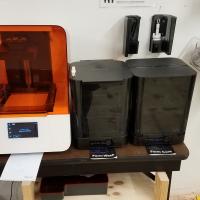
This is a SLA 3D Printer, which uses light to cure resin in layers. This allows it to get very high resolution. There are a number of resins available, including an engineering…
Identify and describe control axes, changing material/platform/tray
Have member describe each step, making sure they mention each point. Actually perform bolded points.
Changing resin
Close air cap on material canister
Remove canister and put on appropriate shelf
Remove tray and put in case on appropriate shelf
Remove build platform and put on appropriate shelf
Replace with desired material, platform, and tray
Working with PreForm
Go to PreForm on the computer next to the printers (or download to your own computer), and connect to the Form 3b at MakeHaven called “DirectKudu” (it’s a unique name like a serial number)
Go to File and Open, select your STL
Using the slicer controls:
Rotate
Scale
Remove single
Remove multiple
Duplicate
After orienting model in slicer, select support button, and add supports and raft (select Auto-Generate All if unsure)
Click “Magic Wand” button on left if you want the computer to prepare everything for you (One Click Print)
Upload and print
Don’t forget to loosen cap on canister to let air in!
Removing material from platform
Lift the lever of the platform on the printer to remove the platform.
Close lid promptly.
Wash cycle
Raise the basket of the wash bin by clicking on the scroll wheel menu of the wash bin. Put platform (same orientation as in printer) into the wash bin and start wash cycle.
Soak in wash bin
After wash cycle, raise basket and inspect print. If needed, remove parts from print platform using pry tool or spatula. Use side-snips to remove remaining support material from part.
Close lid of wash bin promptly.
Let dry for 30 minutes
Cure cycle
Open cure chamber and put part on platform. Start cure cycle.
Pay for Print Material
Keep note of the “Details” pane on the right of PreForm after preparing your sliced file. Either through the MakeHaven store online or in the cash box next to the printer station, please pay for the material used in your print according to the prices listed on the shelf of material currently being used.
Feel free to talk about the following:
Machine levelling
Location of extra IPA (flame cabinet in woodshop)
Check for IPA health using floating gage
If you experience problems that you cannot fix while printing, replace the green check mark with a red X. If able, leave a note on the whiteboard of the problem, and post on Slack
Write on the clipboard by the 48hr table if more resin is needed